5.5.8-代码解析:fun_近5件计算
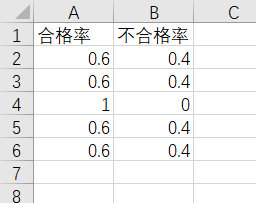
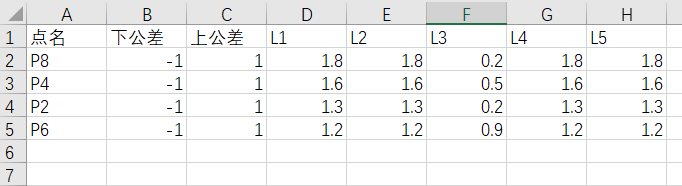
本函数是为了计算最近5个批次的合格率信息,并将其存储在Temp-最近5件合格率工作表。根据最后一批次,计算出不合格点,存储在Temp-不合格点工作表。如下图5-19所示。
代码如下
1   Function fun_近5件计算()
2       Dim arr(1 To 2)
3       currentPath = ThisWorkbook.Path
4       dbExcel = currentPath & "\数据库.xlsx"
5
6       Set wb = Workbooks.Open(dbExcel)
7       Set shtDB = wb.Worksheets(1)
8       maxCol = shtDB.Cells(1, Columns.Count).End(xlToLeft).Column
9       maxRow = shtDB.Cells(Rows.Count, "A").End(xlUp).Row
10
11      ' 最近5件合格率计算
12      Set shtTemp1 = ThisWorkbook.Worksheets("Temp-最近5件合格率")
13      shtTemp1.Cells.ClearContents
14      shtTemp1.Cells(1, "A") = "合格率"
15      shtTemp1.Cells(1, "B") = "不合格率"
16      k = 2
17      If maxCol > 7 Then
18          For j = maxCol - 4 To maxCol Step 1
19              qualifiedCount = 0
20              totalCount = 0
21              For i = 2 To maxRow Step 1
22                  upTol = shtDB.Cells(i, "C")
23                  downTol = shtDB.Cells(i, "B")
24                  devValue = shtDB.Cells(i, j)
25
26                  If devValue <= upTol And devValue >= downTol Then
27                      qualifiedCount = qualifiedCount + 1
28                      totalCount = totalCount + 1
29                  Else
30                      totalCount = totalCount + 1
31                  End If
32
33              Next i
34
35              qualifiedRate = Round(qualifiedCount / totalCount, 3)
36              shtTemp1.Cells(k, "A") = qualifiedRate
37              shtTemp1.Cells(k, "B") = 1 - qualifiedRate
38
39              k = k + 1
40          Next j
41      Else
42          fun_近5件计算 = arr
43          Exit Function
44      End If
45
46      ' 最后一件超差点识别
47      Set shtTemp2 = ThisWorkbook.Worksheets("Temp-不合格点")
48      shtTemp2.Cells.ClearContents
49      shtTemp2.Cells(1, "A") = "点名"
50      shtTemp2.Cells(1, "B") = "下公差"
51      shtTemp2.Cells(1, "C") = "上公差"
52      shtTemp2.Cells(1, "D") = "L1"
53      shtTemp2.Cells(1, "E") = "L2"
54      shtTemp2.Cells(1, "F") = "L3"
55      shtTemp2.Cells(1, "G") = "L4"
56      shtTemp2.Cells(1, "H") = "L5"
57
58      rowInput = 2
59      For i = 2 To maxRow Step 1
60          upTol = shtDB.Cells(i, "C")
61          downTol = shtDB.Cells(i, "B")
62          devValue = shtDB.Cells(i, maxCol)
63
64          If devValue <= upTol And devValue >= downTol Then
65              Debug.Print ("该点合格")
66          Else
67              pointName = shtDB.Cells(i, "A")
68              shtTemp2.Cells(rowInput, 1) = pointName
69              shtTemp2.Cells(rowInput, 2) = downTol
70              shtTemp2.Cells(rowInput, 3) = upTol
71              shtTemp2.Cells(rowInput, 4).Resize(1, 5) = shtDB.Cells(i, maxCol - 4).Resize(1, 5).Value
72
73              rowInput = rowInput + 1
74          End If
75
76      Next i
77
78      ' 超差点排序
79      maxRow = shtTemp2.Cells(Rows.Count, "A").End(xlUp).Row
80      Set rngPoint = Range(shtTemp2.Range("A1"), shtTemp2.Cells(maxRow, "H"))  ' set不可以缺少
81      Set rngSort = Range(shtTemp2.Range("H2"), shtTemp2.Cells(maxRow, "H"))
82
83      shtTemp2.Sort.SortFields.Clear
84
85      shtTemp2.Sort.SortFields.Add Key:=rngSort, _
86          SortOn:=xlSortOnValues, Order:=xlDescending, DataOption:=xlSortNormal
87
88      With shtTemp2.Sort
89          .SetRange rngPoint
90          .Header = xlYes
91          .MatchCase = False
92          .Orientation = xlTopToBottom
93          .SortMethod = xlPinYin
94          .Apply
95      End With
96
97      arr(1) = shtDB.Cells(1, maxCol)  '  ID号
98      arr(2) = maxRow - 1
99      wb.Close
100
101     fun_近5件计算 = arr
102 End Function
关键代码解读
1)第71行:shtTemp2.Cells(rowInput, 4).Resize(1, 5) = shtDB.Cells(i, maxCol - 4).Resize(1, 5).Value。批量复制单元格区域。以左上角为起点,Resize(1,5)表示1行5列,如下图所示
| 1 | 2 | 3 | 4 | 5 |
2)第97-98行:arr(1) = shtDB.Cells(1, maxCol) ,arr(2) = maxRow - 1。该函数返回一个数组,arr(1)是最新一个批次的时间信息,arr(2)是总点数。