4.5.6-代码解析:L113_Sub_证书
该Sub的功能就是获取员工的证书信息,其实整体方法和上一节类似,只是在写入员工档案时需要写在特定区域,并且按照从左至右,从上向下的顺序,如图4-24所示。这种需求在填写获奖信息部分也是一样的,只是开始结束行不一样,所以将这一部分功能写成一个单独的过程L1131_Sub_writeToRng。
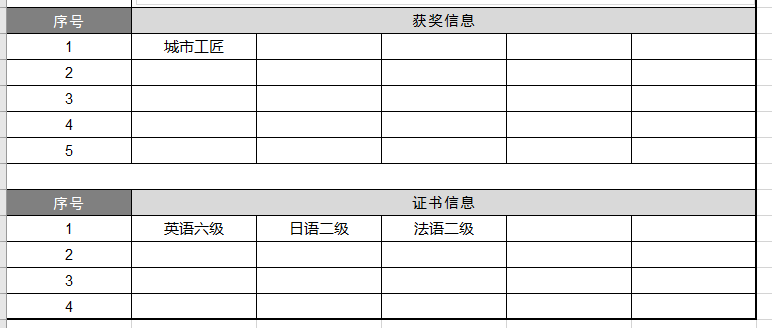
代码如下
1   Sub L113_Sub_证书(shtOutput, employeeName)
2       Set sht = ThisWorkbook.Worksheets("证书信息")
3       maxRow = sht.Cells(Rows.Count, "B").End(xlUp).Row
4
5       startRow = 24
6       endRow = 27
7       startCol = 2
8       endCol = 6
9
10      For i = 2 To maxRow Step 1
11          employeeNameDB = sht.Cells(i, "B")
12          If employeeNameDB = employeeName Then
13              certificate = sht.Cells(i, "C")
14              Call L1131_Sub_writeToRng(certificate, shtOutput, startRow, endRow, startCol, endCol)
15
16          End If
17      Next i
18
19  End Sub
按照从左到右,从上到下写入信息。基本逻辑如下:
1)设置标识符flag,表示是否将信息成功写入
2)两个循环:外层循环,对行循环;内层循环,对列循环。通过这两个循环实现从左到右,从上到下依次写入信息
3)行循环中,先判断标识符flag信息,判断是否已经成功写入,若已经写入,则退出循环
4)列循环中,先判断被循环单元格是否为空,若为空,则写入拟写入的信息,并将flag设置为1
1   Sub L1131_Sub_writeToRng(inputSth, shtOutput, startRow, endRow, startCol, endCol)
2       flag = 0
3
4       For i = startRow To endRow Step 1
5           If flag = 1 Then
6               Exit For
7           End If
8
9           For j = startCol To endCol Step 1
10              inputCell = shtOutput.Cells(i, j)
11              If inputCell = "" Then
12                  shtOutput.Cells(i, j) = inputSth
13                  flag = 1
14                  Exit For
15              End If
16
17          Next j
18      Next i
19  End Sub
关键代码解读
1)第6行:Exit For。退出最近一层For循环,从该行代码向上找,找到的第一个For循环,退出该For循环。
过程L114_Sub_获奖代码与L113_Sub_证书基本类似,就不单独讲解了