4.3-代码
初学者,建议将以下代码打印出来,拿出笔一行一行去看,当然后文我也是一行一行解读的
Sub L1_Sub_生成个人档案()
    Set shtFirst = ThisWorkbook.Worksheets("操作界面")
    maxRow = shtFirst.Cells(Rows.Count, "B").End(xlUp).Row
    If maxRow > 2 Then
        For i = 3 To maxRow Step 1
            employeeName = shtFirst.Cells(i, "B")
            If employeeName <> "" Then
                tips = "正在生成个人档案:" & employeeName
                Debug.Print (tips)
                returnTips = L11_Fun_createPersonalFile(employeeName)
                shtFirst.Cells(i, "C") = returnTips
            End If

        Next i
    Else
        MsgBox "请输入员工姓名"
    End If
End Sub

Function L11_Fun_createPersonalFile(employeeName)
    Application.DisplayAlerts = False

    currentPath = ThisWorkbook.Path
    folderAddress = currentPath & "\" & "个人档案"
    newFileName = employeeName & ".xlsx"

    newFileAddress = folderAddress & "\" & newFileName
    ' 检查文件是否已经存在,存在则删除
    If Dir(newFileAddress) <> "" Then
        Kill newFileAddress
    End If

    templateFile = "个人档案模板.xlsx"
    templateFileAddress = currentPath & "\" & templateFile
    FileCopy templateFileAddress, newFileAddress

    Set wb = Workbooks.Open(newFileAddress)
    Set shtOutput = wb.Worksheets(1)

    ' 填入信息
    shtOutput.Range("D2") = employeeName
    shtOutput.Range("F1") = Now()

    tips1 = L111_Fun_人员信息(shtOutput, employeeName)
    tips2 = L112_Fun_考核成绩(shtOutput, employeeName)
    Call L113_Sub_证书(shtOutput, employeeName)
    Call L114_Sub_获奖(shtOutput, employeeName)
    Call L115_Sub_员工照片(shtOutput, employeeName)

    wb.Save
    wb.Close

    returnTips = tips1 & ";" & tips2

    L11_Fun_createPersonalFile = returnTips
End Function

Function L111_Fun_人员信息(shtOutput, employeeName)
    ' 从人员信息表中获取基础信息
    Set shtPerson = ThisWorkbook.Worksheets("人员信息")
    Set shtRng = shtPerson.Range("B:B")
    pos = Application.Match(employeeName, shtRng, 0)

    If IsError(pos) Then
        returnTips = "未找到人员基础信息"
    Else
        birthPlace = shtPerson.Cells(pos, "C")
        school = shtPerson.Cells(pos, "D")
        major = shtPerson.Cells(pos, "E")
        cellphone = shtPerson.Cells(pos, "F")
        contactAddress = shtPerson.Cells(pos, "G")
        academicCredentials = shtPerson.Cells(pos, "H")

        shtOutput.Range("F2") = birthPlace
        shtOutput.Range("D3") = school
        shtOutput.Range("F3") = major
        shtOutput.Range("D4") = cellphone
        shtOutput.Range("F4") = academicCredentials
        shtOutput.Range("D5") = contactAddress

        returnTips = "人员信息已找到"
    End If

    L111_Fun_人员信息 = returnTips
End Function

Function L112_Fun_考核成绩(shtOutput, employeeName)
    ' 清空原数据
    shtOutput.Range("J10:O11").ClearContents

    Set sht = ThisWorkbook.Worksheets("考核成绩")
    maxRow = sht.Cells(Rows.Count, "B").End(xlUp).Row

    col = 10
    flag = 0
    For i = 2 To maxRow Step 1
        employeeNameDB = sht.Cells(i, "B")
        If employeeNameDB = employeeName Then
            yearInfo = sht.Cells(i, "C")
            noteInfo = sht.Cells(i, "D")

            shtOutput.Cells(10, col) = yearInfo
            shtOutput.Cells(11, col) = noteInfo

            col = col + 1

            flag = 1
        End If
    Next i

    If flag = 1 Then
        returnTips = "找到人员考核成绩"
    Else
        returnTips = "未找到人员考核成绩"
    End If

    L112_Fun_考核成绩 = returnTips

End Function

Sub L113_Sub_证书(shtOutput, employeeName)
    Set sht = ThisWorkbook.Worksheets("证书信息")
    maxRow = sht.Cells(Rows.Count, "B").End(xlUp).Row

    startRow = 24
    endRow = 27
    startCol = 2
    endCol = 6

    For i = 2 To maxRow Step 1
        employeeNameDB = sht.Cells(i, "B")
        If employeeNameDB = employeeName Then
            certificate = sht.Cells(i, "C")
            Call L1131_Sub_writeToRng(certificate, shtOutput, startRow, endRow, startCol, endCol)

        End If
    Next i

End Sub

Sub L114_Sub_获奖(shtOutput, employeeName)
    Set sht = ThisWorkbook.Worksheets("获奖信息")
    maxRow = sht.Cells(Rows.Count, "B").End(xlUp).Row

    startRow = 17
    endRow = 21
    startCol = 2
    endCol = 6

    For i = 2 To maxRow Step 1
        employeeNameDB = sht.Cells(i, "B")
        If employeeNameDB = employeeName Then
            certificate = sht.Cells(i, "C")
            Call L1131_Sub_writeToRng(certificate, shtOutput, startRow, endRow, startCol, endCol)

        End If
    Next i

End Sub

Sub L1131_Sub_writeToRng(inputSth, shtOutput, startRow, endRow, startCol, endCol)
    flag = 0

    For i = startRow To endRow Step 1
        If flag = 1 Then
            Exit For
        End If

        For j = startCol To endCol Step 1
            inputCell = shtOutput.Cells(i, j)
            If inputCell = "" Then
                shtOutput.Cells(i, j) = inputSth
                flag = 1
                Exit For
            End If

        Next j
    Next i
End Sub

Sub L115_Sub_员工照片(shtOutput, employeeName)
    currentPath = ThisWorkbook.Path
    folderAddress = currentPath & "\" & "图片库"
    photoName = employeeName & ".png"
    photoAddress = folderAddress & "\" & photoName

    If Dir(photoAddress) <> "" Then
        'msoShapeRectangle是类别,是一个矩形
        shtOutput.Shapes.AddShape(msoShapeRectangle, _
        shtOutput.Range("A2").Left, _
        shtOutput.Range("B2").Top, _
        shtOutput.Range("A2").Width * 2, _
        shtOutput.Range("A2").Height * 7).Select

        Selection.ShapeRange.Fill.Visible = msoFalse
        Selection.ShapeRange.Line.Visible = msoTrue

        With Selection.ShapeRange.Fill
            .Visible = msoTrue
            .UserPicture photoAddress
            .TextureTile = msoFalse
        End With
    End If
End Sub
以上代码写在一个模块中,涉及到3个Function和5个Sub。为了便于区别,每个过程或者函数的名称中包含了过程Sub或者函数Fun的区分。简单理解的话,当我们需要返回一个信息时使用Function,如果只是执行一段特定功能的代码,无需返回值,使用Sub即可。
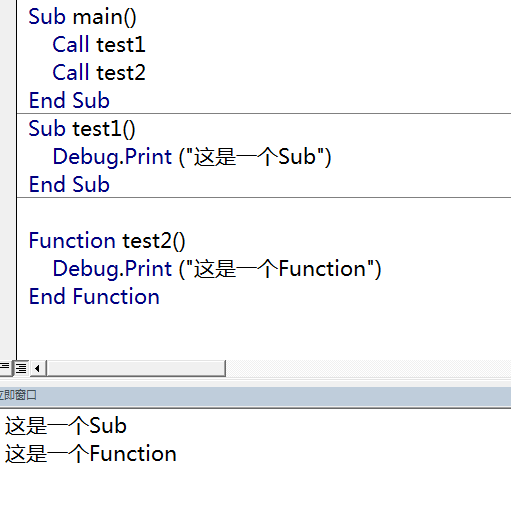
做了一段测试,同样的功能分别使用 Sub和 Function实现,同样采用Call Sub名称/函数名称的方式实现,从结果上来看没有什么区别。