6.4-显示问题
显示数据库中所有已定义问题。逻辑如下:
1)对页面中所有的形状进行遍历
2)除了操作按钮和背景图片之外的所有形状全部删除。系统中自定义的按钮和插入的图片,也是属于形状元素,所以务必将这些形状进行保留
3)遍历数据库中每一行,生成对应的形状,并更新形状对应的变量名称。更新形状对应的变量名称非常重要,因为重新生成的图形对应的变量名称是由系统自动生成的,只能记下,无法修改(或者只是我还未找到)
代码如下
Function reserveShape(shapeName, shapeArray)
    result = False

    For Each ele In shapeArray
        If shapeName = ele Then
            result = True
            Exit For
        End If
    Next

    reserveShape = result

End Function
Sub delAllShape()
    Set sht = ThisWorkbook.Worksheets("问题管理")

    shapeArray = Array("Picture 20", "Button 12", "Button 13", _
    "Button 14", "Button 15", "Button 16", "Button 17", "Button 20")

    For Each sh In sht.Shapes
        shapeName = sh.Name

        reserveYn = reserveShape(shapeName, shapeArray)
        If Not reserveYn Then
            sh.Delete
        End If
    Next

End Sub
Sub showAllProblem()
    Call delAllShape
    Set sht = ThisWorkbook.Worksheets("问题管理")
    ' 获取行数
    maxRow = sht.Cells(Rows.Count, "Q").End(xlUp).Row

    For i = 3 To maxRow Step 1
        shapeName = sht.Cells(i, "Q").Value
        questionType = sht.Cells(i, "K").Value

        If questionType = "尺寸" Then
            shapeType = msoShapeOval
        Else
            shapeType = msoShapeRectangle
        End If

        positionX = sht.Cells(i, "R").Value
        positionY = sht.Cells(i, "S").Value
        widthVal = sht.Cells(i, "T").Value
        heightVal = sht.Cells(i, "U").Value
        fillColor = sht.Cells(i, "V").Value
        lineColor = sht.Cells(i, "W").Value

        Set newShape = sht.Shapes.AddShape(shapeType, positionX, positionY, widthVal, heightVal)
        shapeName = newShape.Name
        Debug.Print (shapeName)

        sht.Cells(i, "Q").Value = shapeName

        With newShape.Fill
            .Visible = msoTrue
            .ForeColor.RGB = fillColor
            .Transparency = 0
            .Solid
        End With

        With newShape.Line
            .Visible = msoTrue
            .ForeColor.RGB = lineColor
            .Transparency = 0
        End With

    Next i
End Sub
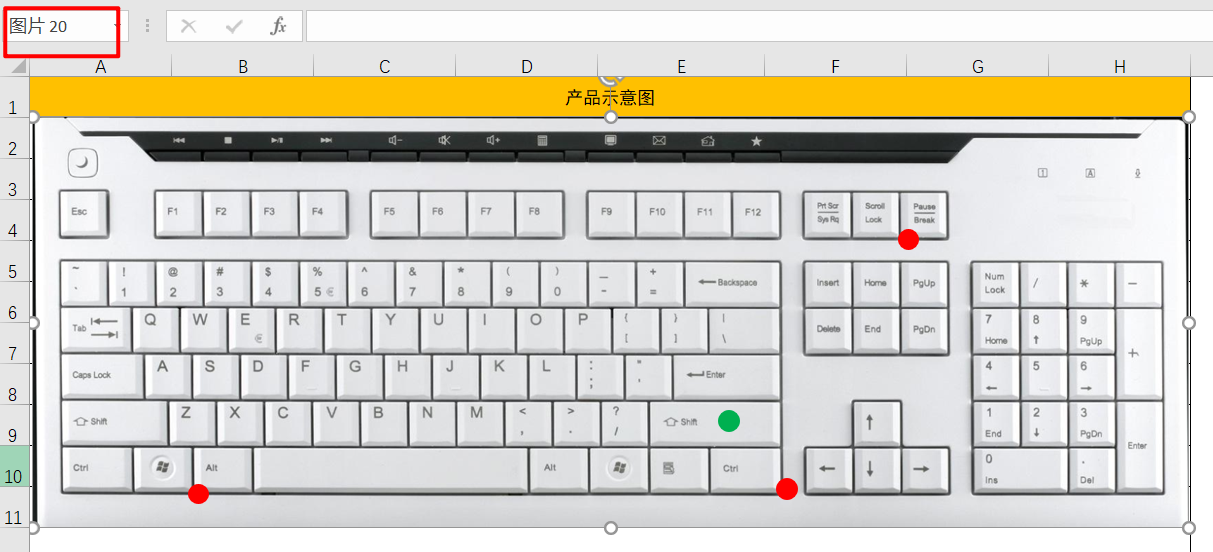
其中主过程是showAllProblem,在显示所有形状前,务必要删除原有的表征问题的形状元素,防止重复。关于需要保留的形状的变量名称获取,可以单独写一个遍历,打印出来,然后保存即可。其实选中某个形状,在Excel的左上角区域会显示出来,只不过用的是中文,如图6-5所示,插入的背景图片对应的变量名称为 图片20,对应的实际名称为Picture 20。
shapeArray = Array("Picture 20", "Button 12", "Button 13", _
    "Button 14", "Button 15", "Button 16", "Button 17", "Button 20")